1. Explain the term “distributed systems”, contrasting it from “distributed computing”
 Distributed computing is a field of computer science that studies distributed systems. A distributed system is a system whose components are located on different networked computers, which communicate and coordinate their actions by passing messages to one another.The components interact with one another in order to achieve a common goal. Three significant characteristics of distributed systems are: concurrency of components, lack of a global clock, and independent failure of components.Examples of distributed systems vary from SOA-based systems to massively multiplayer online games to peer-to-peer applications.
2. Compare and contrast the standalone systems with distributed systems, providing examples for advantageous use of both
standalone systems
A standalone device is any mechanism or system that can perform its function without the need of another device, computer, or connection. A perfect example of astandalone device is a copy or fax machine, as shown in the picture.
ex-: (JAVA, .NET)


distributed systems
A distributed system is a system whose components are located on different networked computers, which communicate and coordinate their actions by passing messages to one another.
ex-: (HTML +CSS + JS + PHP)


3. Discuss the elements of distributed systems
4. Identify different types of services, which can be gained from distributed systems, specifying the protocols used for them
6. Discuss the characteristics of different types of Web-based systems, including the RiWAs
https://www.youtube.com/watch?v=9qwq01qggYo
7. Explain different architectures for distributed systems, explaining special features of each.
client-server (or two-tier) architecture
Two Tier application AKA Client-Server application.

3-tier architecture
Three Tier application AKA Web Based application
 n-tier architecture
n-tier architecture is a client–server architecture in which presentation, application processing, and data management functions are physically separated.
Service Oriented Architecture (SOA)
Service-oriented architecture (SOA) is a style of software design where services are provided to the other components by application components, through a communication protocol over a network. The basic principles of service-oriented architecture are independent of vendors, products and technologies.

https://www.youtube.com/watch?v=L5BlpPU_muY
8. Compare and contrast the micro-service architecture from monolithic architecture
 micro-service architecture
micro service is a small application that has its own hexagonal architecture consisting of business logic along with various adapters.
monolithic architecture
Micro services Architecture is to split your application into a set of smaller, inter connected services instead of building a single monolithic application.
9. Explain the MVC style, indicating the limitations of it in the context of web-based systems
MVC is Model-View-Controller Pattern.
This pattern is used to separate application's concerns. Model - Model represents an object or JAVA POJO carrying data.
Modularizing Styles


10. Identify different approaches of use of MVC for web-based systems and discuss their strengths and weaknesses
11. Discuss the need for very specific type of communication technologies/techniques for the distributed/web-based systems
1. Functional oriented communication

2. Message Oriented communication
Message-oriented communication is a way of communicating between processes. Messages, which correspond to events, are the basic units of data delivered. ... In synchronouscommunication, the sender blocks waiting for the receiver to engage in the exchange.

3. Resource oriented communication
A resource-oriented architecture (ROA) is the structural design supporting the internet working of resources. A resource, in this context, is any entity that can be identified and assigned a uniform resource identifier .
12. Compare and contrast RPC with RMI

13. Explain the need for CORBA, indicating it’s use in web-based systems
Common Object Request Broker Architecture
A software-based interface from the Object Management Group that allows software modules to communicate with each other no matter where they are located on a private network or the global Internet. CORBA is a "distributed objects" system designed for multi-tier, client/server applications, where processing data in one computer requires additional processing by some other service in another computer in order to complete the transaction.

14. Discuss the XML specification, highlighting the important sections such as element naming
conventions

15. Compare and contrast XML and JSON, indicating the pros and cons of both


16. Identify other data formatting/structuring techniques available for the communication of web-based systems
 Distributed computing is a field of computer science that studies distributed systems. A distributed system is a system whose components are located on different networked computers, which communicate and coordinate their actions by passing messages to one another.The components interact with one another in order to achieve a common goal. Three significant characteristics of distributed systems are: concurrency of components, lack of a global clock, and independent failure of components.Examples of distributed systems vary from SOA-based systems to massively multiplayer online games to peer-to-peer applications.
2. Compare and contrast the standalone systems with distributed systems, providing examples for advantageous use of both
standalone systems
A standalone device is any mechanism or system that can perform its function without the need of another device, computer, or connection. A perfect example of astandalone device is a copy or fax machine, as shown in the picture.
ex-: (JAVA, .NET)


distributed systems
A distributed system is a system whose components are located on different networked computers, which communicate and coordinate their actions by passing messages to one another.
ex-: (HTML +CSS + JS + PHP)


3. Discuss the elements of distributed systems
- Data stores (data bases) and Data
- Theconfiguration of the above elements
- The components to share the computing resources ,increasing the processing power ,provide better user experience
- The users to share data and other resources, such as documents and files
- The engineers to have a centralized control
- Processing components
- Data networksfor components to communicate
4. Identify different types of services, which can be gained from distributed systems, specifying the protocols used for them
- Mail service SMTP, POP3, IMAP
- File transferring and sharing FTP
- Remote logging (telnet)
- Games and multimedia RTP, SIP,H.26x
- Web HTTP
- The world wide web – information, resource sharing
- Clusters, Network of workstations
- Distributed manufacturing system (e.g.,automated assembly line)
- Network of branch office computers -Information system to handle automatic
- processing of orders
- Network of embedded systems
- New Cell processor (PlayStation 3)


6. Discuss the characteristics of different types of Web-based systems, including the RiWAs
non-browser-based client-components of RiWAs
The standard desktop application development TTs like JAVA or .Net and related libraries/frameworks can be utilized for non-browser-based client-components development. For DC development, these frameworks may contain their own tools or some third-party
frameworks/libraries can be incorporated.
Browser-based Client-Components of RiWAs
There are several approaches for the browser-based RiWAs, inherited from RIAs. The first approach, which is the proprietary plugin based approach, uses the technologies such as Adobe (former Macromedia) Flash/Flex [13], JAVA Applets, or MS Silverlight . These technologies are enriched with utensils for developing desktop applications like rich GUIs.
7. Explain different architectures for distributed systems, explaining special features of each.
client-server (or two-tier) architecture
Two Tier application AKA Client-Server application.
The Two-tier architecture is divided into two parts:
1. Client Application (Client Tier)
2. Database (Data Tier)
2. Database (Data Tier)
Client system handles both Presentation and Application layers and Server system handles Database layer. It is also known as client server application. The communication takes place between the Client and the Server. Client system sends the request to the Server system and the Server system processes the request and sends back the data to the Client System

3-tier architecture
Three Tier application AKA Web Based application
The Three-tier architecture is divided into three parts:
1. Presentation layer (Client Tier)
2. Application layer (Business Tier)
2. Database layer (Data Tier)
2. Application layer (Business Tier)
2. Database layer (Data Tier)
Client system handles Presentation layer, Application server handles Application layer and Server system handles Database layer.

n-tier architecture is a client–server architecture in which presentation, application processing, and data management functions are physically separated.

Service Oriented Architecture (SOA)
Service-oriented architecture (SOA) is a style of software design where services are provided to the other components by application components, through a communication protocol over a network. The basic principles of service-oriented architecture are independent of vendors, products and technologies.

https://www.youtube.com/watch?v=L5BlpPU_muY
8. Compare and contrast the micro-service architecture from monolithic architecture
 micro-service architecture
micro service is a small application that has its own hexagonal architecture consisting of business logic along with various adapters.
monolithic architecture
Micro services Architecture is to split your application into a set of smaller, inter connected services instead of building a single monolithic application.
9. Explain the MVC style, indicating the limitations of it in the context of web-based systems
MVC is Model-View-Controller Pattern.
This pattern is used to separate application's concerns. Model - Model represents an object or JAVA POJO carrying data.
Modularizing Styles
- Classic MVC

- client-side mvc

- client-mvc and server-mvc

- MVC web version

- BAW-MVC

10. Identify different approaches of use of MVC for web-based systems and discuss their strengths and weaknesses
Model view controller (MVC) [1] is an architectural pattern usually used in web-based applications. It provides three main layers; model, view, and controller. Many developers use MVC as a standard design pattern. It is a complete framework. MVC provide three types of classes:
- A. Model- Model classes are used to implement the logic of data domains. These classes are used to retrieve, insert or update the data into the database associated with our application.
- View- Views are used to prepare the interface of our application. By using that interface users interact with our application.
- Controller- Controller classes are used to respond to the user’s requests. Controller classes perform the users requested actions. These classes work with model classes and select the appropriate view that should be displayed to the user according to user requests.

11. Discuss the need for very specific type of communication technologies/techniques for the distributed/web-based systems
1. Functional oriented communication

2. Message Oriented communication
Message-oriented communication is a way of communicating between processes. Messages, which correspond to events, are the basic units of data delivered. ... In synchronouscommunication, the sender blocks waiting for the receiver to engage in the exchange.

3. Resource oriented communication
A resource-oriented architecture (ROA) is the structural design supporting the internet working of resources. A resource, in this context, is any entity that can be identified and assigned a uniform resource identifier .
12. Compare and contrast RPC with RMI
RPC and RMI are the mechanisms which enable a client to invoke the procedure or method from the server through establishing communication between client and server. The common difference between RPC and RMI is that RPC only supports procedural programming whereas RMI supports object-oriented programming.
Another major difference between the two is that the parameters passed to remote procedures call consist of ordinary data structures. On the other hand, the parameters passed to remote method consist of objects

Common Object Request Broker Architecture
A software-based interface from the Object Management Group that allows software modules to communicate with each other no matter where they are located on a private network or the global Internet. CORBA is a "distributed objects" system designed for multi-tier, client/server applications, where processing data in one computer requires additional processing by some other service in another computer in order to complete the transaction.

XML stands for Extensible Markup Language. It is a text-based markup language derived from Standard Generalized Markup Language (SGML).
XML tags identify the data and are used to store and organize the data, rather than specifying how to display it like HTML tags, which are used to display the data. XML is not going to replace HTML in the near future, but it introduces new possibilities by adopting many successful features of HTML.

There are three important characteristics of XML that make it useful in a variety of systems and solutions −
- XML is extensible − XML allows you to create your own self-descriptive tags, or language, that suits your application.
- XML carries the data, does not present it − XML allows you to store the data irrespective of how it will be presented.
- XML is a public standard − XML was developed by an organization called the World Wide Web Consortium (W3C) and is available as an open standard.
XML Usage
A short list of XML usage says it all −
- XML can work behind the scene to simplify the creation of HTML documents for large web sites.
- XML can be used to exchange the information between organizations and systems.
- XML can be used for offloading and reloading of databases.
- XML can be used to store and arrange the data, which can customize your data handling needs.
- XML can easily be merged with style sheets to create almost any desired output.
- Virtually, any type of data can be expressed as an XML document.s
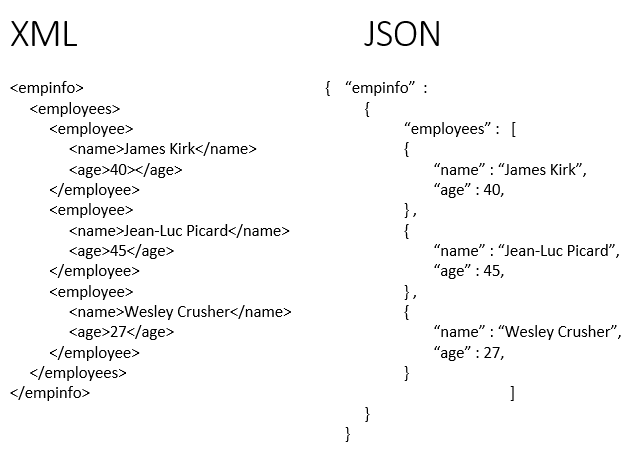
15. Compare and contrast XML and JSON, indicating the pros and cons of both
JSON (JavaScript Object Notation) is a lightweight data-interchange format and it completely language independent. It is based on the JavaScript programming language and easy to understand and generate.
XML (Extensible markup language) was designed to carry data, not to display data. It is a W3C recommendation. Extensible Markup Language (XML) is a markup language that defines a set of rules for encoding documents in a format that is both human-readable and machine-readable. The design goals of XML focus on simplicity, generality, and usability across the Internet. It is a textual data format with strong support via Unicode for different human languages. Although the design of XML focuses on documents, the language is widely used for the representation of arbitrary data structures such as those used in web services.

16. Identify other data formatting/structuring techniques available for the communication of web-based systems
In a web-based learning environment communication can be either:
Synchronous- communication takes place at the same time. This requires that all participants are present at the same time. This type of communication is used fairly rarely for specific purposes such as getting acquainted, changing opinions, working in small groups, brainstorming etc.
Asynchronous- communication takes place at different times or over a certain period of time. This allows more time to work on your messages and to react to other students' messages.
Communication can vary also depending on the amount of people it involves. Communication on the web can be divided into the following types, involving a different amount of participants at a time:
One to one- one person communicates with somebody else, for example a student sends an A&O e-mail message to his/her trainer
One to many- one person communicates with many others, e.g. a student posts a message in A&O's discussion forum
Many to many- many persons communicate with each other, e.g. via videoconferencing
The most relevant tools for communication in the VERT courses you are about to take are the
following:
Internet e-mail- The regular e-mail can be sent to the instructor or other students e.g. if there is something that needs immediate attention.
A&O's mail- This e- mail is dedicated to studying and stays in A&O virtual learning environment.
A&O discussion forum- A tool for asynchronous, one-to-many communication for many purposes.
Synchronous- communication takes place at the same time. This requires that all participants are present at the same time. This type of communication is used fairly rarely for specific purposes such as getting acquainted, changing opinions, working in small groups, brainstorming etc.
Asynchronous- communication takes place at different times or over a certain period of time. This allows more time to work on your messages and to react to other students' messages.
Communication can vary also depending on the amount of people it involves. Communication on the web can be divided into the following types, involving a different amount of participants at a time:
One to one- one person communicates with somebody else, for example a student sends an A&O e-mail message to his/her trainer
One to many- one person communicates with many others, e.g. a student posts a message in A&O's discussion forum
Many to many- many persons communicate with each other, e.g. via videoconferencing
The most relevant tools for communication in the VERT courses you are about to take are the
following:
Internet e-mail- The regular e-mail can be sent to the instructor or other students e.g. if there is something that needs immediate attention.
A&O's mail- This e- mail is dedicated to studying and stays in A&O virtual learning environment.
A&O discussion forum- A tool for asynchronous, one-to-many communication for many purposes.
References
- https://medium.com/koderlabs/introduction-to-monolithic-architecture-and-microservices-architecture-b211a5955c63
- https://ifs.host.cs.st-andrews.ac.uk/Books/SE9/Web/DistribSys/Corba.html


